Platform
The fund office, on one platform.
Everything a pension fund does in a month, from the payroll file to the benefit statement, with a second pair of eyes on every movement of money and a nightly scan for what has been missed.
01Action Centre
Problems found overnight, not at the audit.
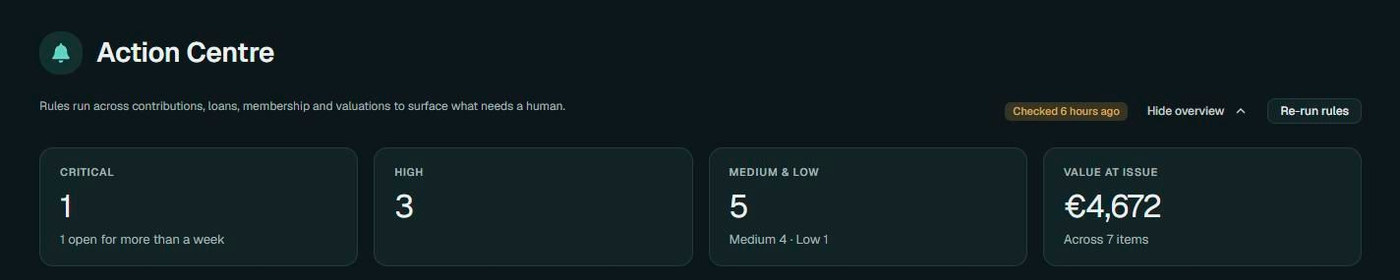
A rule engine scans the fund every night and on demand. It looks for the things that go wrong in a pension fund: a contribution month that never arrived, a member left out of a run, a leaver whose final contribution is missing, a loan in arrears or past maturity, a plan without a current valuation, a member record with gaps. Findings are ranked, tracked through to resolution, and closed automatically when the data puts them right.
What you get
- Contributions: missing periods, members omitted from a run, leavers' final contributions
- Loans: arrears, matured but still open, approved but not paid out
- Membership: unsettled leavers, derived benefits pending, incomplete records
- Valuation: missing or stale unit prices
- Open, acknowledged, resolved, auto-resolved or dismissed
- Month overview, trend and forecast
02Approvals
Nothing moves money on one person's say-so.
Contributions and other transactions post as unapproved and wait in a queue, grouped by employer, type and month. Member profile changes, loan requests and plan switches join the same queue. An officer approves, holds or rejects, and the member is told by email. Requests that move a member's money ask them to confirm with their password first.
What you get
- One queue: transaction batches, profile changes, loans and plan switches
- Approve, hold or reject, with a comment
- Email to the member at each outcome
- Password confirmation on member requests that move money
- Who posted, who approved and when, on every record
03Contributions
The payroll file, checked before it becomes the ledger.
Each employer downloads a template already filled with its members, adds the month's figures and uploads it. Pensus shows a preview, flags what does not add up and lists members who are missing, before anything is committed. Every uploaded file is kept. One-off contributions, balances brought forward and transfers in and out, including IORP transfers, go through the same door.
What you get
- Pre-filled Excel template per employer
- Preview and validation before commit
- Members left out of a run are flagged
- Member, employer and loan-repayment shares on every line
- One-off contributions, transfers in and out, IORP transfers
- Uploaded files kept with the run
04Ledger and runs
A ledger that refuses to do the unsafe thing.
Every movement in the fund is a transaction of a known type. Distributions and derived-benefit sweeps post as runs that can only be reversed as a whole, newest first, and never once anyone in them has been paid. When Pensus refuses, it says why.
What you get
- Fifteen transaction types
- Bulk runs for distributions and derived benefits
- Reverse a whole run, newest first
- Blocked once a member in the run has been paid
- Approve or revert pending transactions
05Plans and unit prices
Plans members can understand, prices you can stand behind.
A fund can offer several plans, each with a risk score from 1 to 7, objectives, suitability, expected return and volatility, an annual charge and an asset mix across cash, fixed income, equities and alternatives. Unit prices are kept daily, weekly or monthly. Returns are distributed per plan with a preview before posting, and members can ask to switch plans, which the fund approves with a value date.
What you get
- Risk score 1 to 7, objectives, suitability and horizon
- Asset mix: cash, fixed income, equities, alternatives
- Unit price history at daily, weekly or monthly frequency
- Distributions and adjustment distributions, previewed then posted
- Plan switch requests with value date and comment
06Member loans
Loans against the pot, without the paperwork.
Members apply online for a residence, medical or education loan, up to 45% of their balance, and confirm with their password. The fund can also create a loan on a member's behalf. Rates are fixed or follow an adjustment table. Repayments arrive with the payroll file, early repayments are matched to the bank transfer, and arrears are caught by the nightly checks.
What you get
- Residence, medical and education loans
- Up to 45% of the member's balance
- Fixed or adjustable rates
- Approve, hold or reject, with an email at each step
- Repayment through payroll, early repayment notices
- Loan statement and full repayment schedule
07Leavers and lifecycle
Leavers handled by the rules, not from memory.
A member on unpaid or maternity leave is frozen by month, back-dated or scheduled. A leaver is recorded without posting anything; at the next distribution the unvested employer money is forfeited under the employer's vesting scale and shared among the members who remain. Settlement waits for the statutory period your fund sets, is blocked while a loan is open, and can be paid in full or in instalments. A leaver who did not really leave can be reinstated.
What you get
- Freeze by month, back-dated or scheduled
- Vesting scales per employer
- Derived benefits shared among remaining members
- Statutory waiting period enforced
- Settle in full or in instalments
- Reinstate a leaver
08Statements
The statements members are owed, on demand.
Four statements are generated as PDF, with charts, your fund's logo, report footnote and disclaimer: the account statement, the annual contribution statement, the pension benefit statement and the loan statement. Each comes in a member, employer and fund version, so everyone reads from the same numbers.
What you get
- Account statement
- Annual contribution statement
- Pension benefit statement
- Loan statement
- Member, employer and fund versions
- Your logo, footnote and disclaimer
09Scheme and employers
Set up once, the way your rules are written.
The fund's details, logo, report footnote and disclaimer, how often returns are distributed, what members may change themselves and the leaver waiting period are all settings. In a multi-employer fund each employer has its own contribution bands, a start delay after employment and a vesting scale. Forms, statutory information and other documents sit in the fund's library for members to download.
What you get
- Single and multi-employer funds
- Contribution bands per employer, by percentage or fixed amount
- Vesting scale per employer
- Identity-document requirements for members
- Document library: forms, statutory information, tools
- Your branding on screens, statements and emails
The actual product
The fund at a glance, every morning
What has come in from members and employers, and who is in the fund. Captured from a working fund; every fund runs Pensus under its own name and logo.
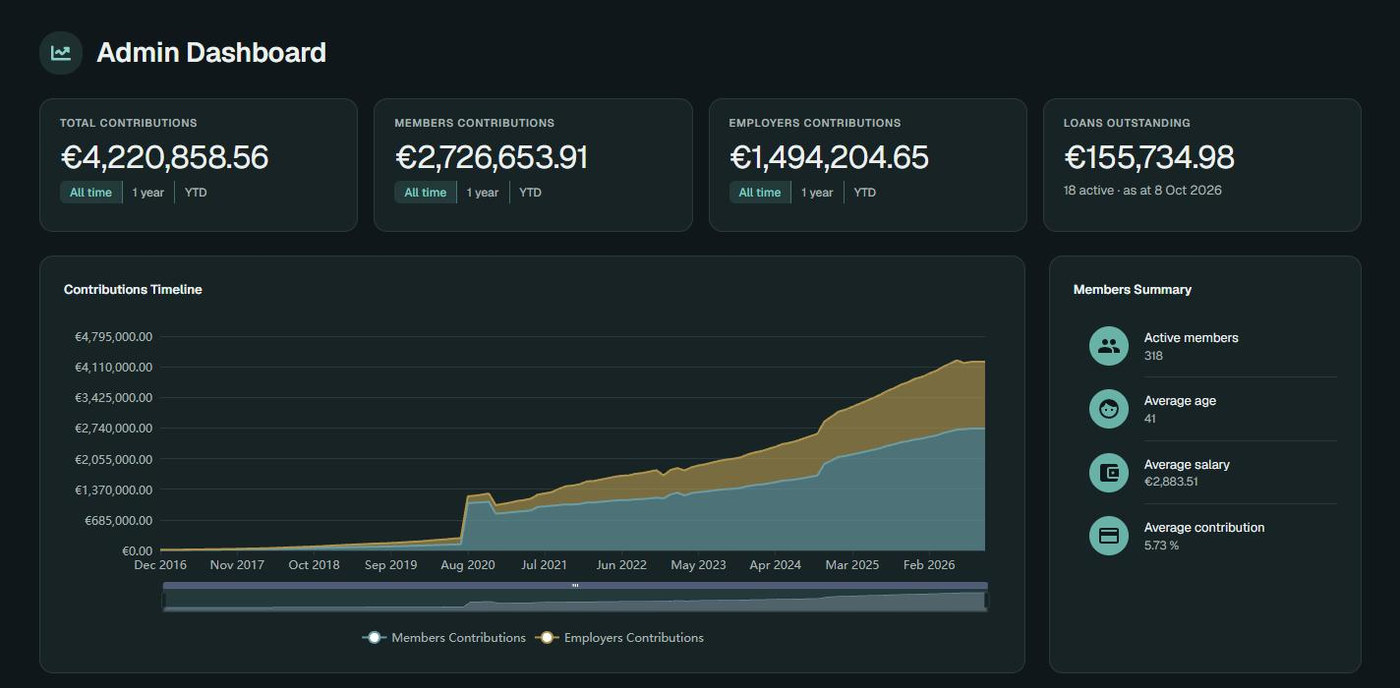
Screens from the running platform. The names and figures shown are not real member data.
Want to see a specific workflow?
Leavers, loans, distributions, the payroll file: tell us which and we will build the walkthrough around it.
Or write to us at [email protected]